EXPOSE 2 | Instantly Spot Mix Issues Before Release
Product Name: EXPOSE 2
Product Type: Standalone audio application
Brand: Mastering The Mix
Primary Category: Audio quality control application
Primary Use: Checking finished masters for technical issues before release
Best For: Release-stage quality control, streaming loudness checks, label deliveries
Format: Standalone application
Platforms: macOS and Windows
License: 2 license seats as standard
Description
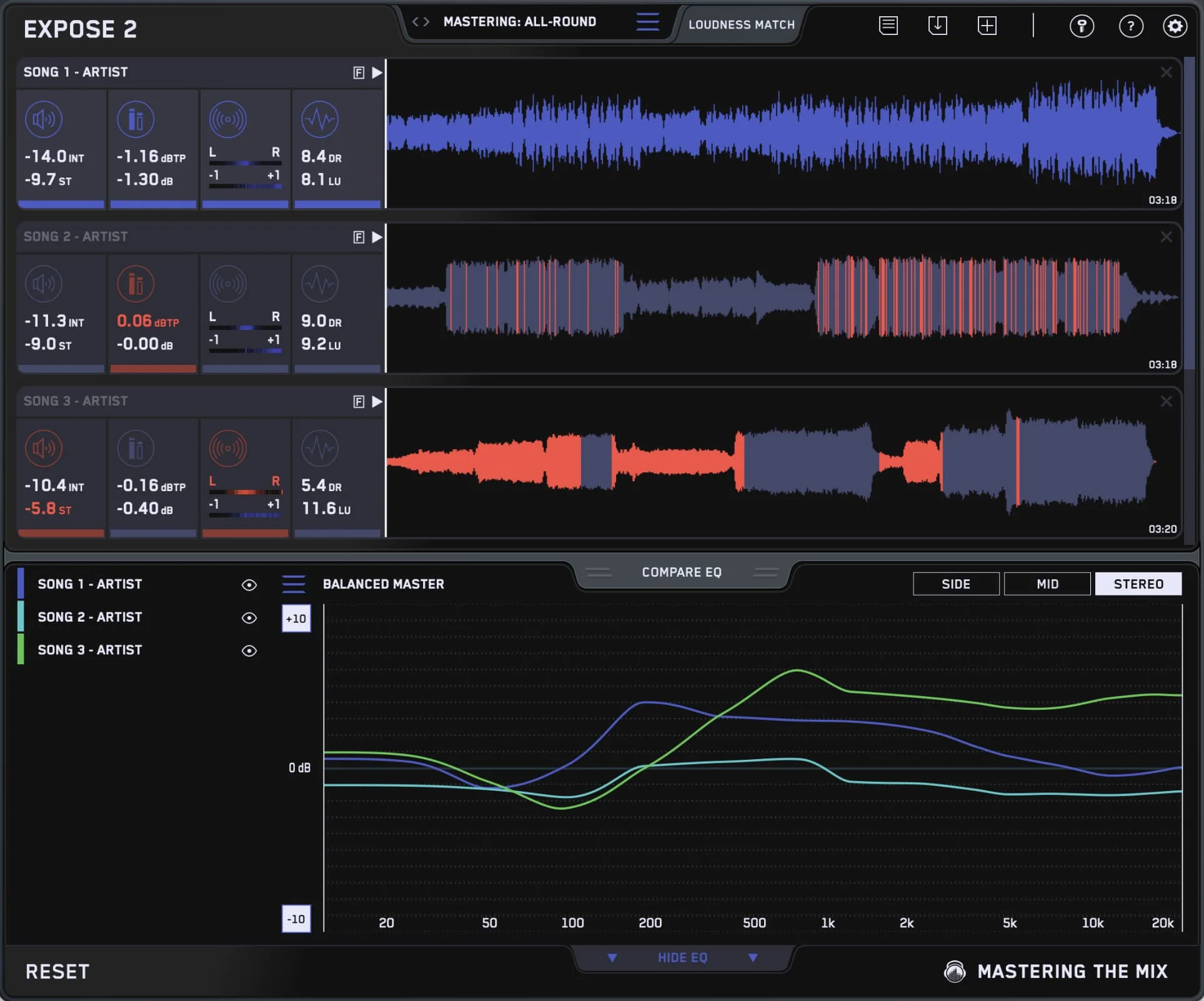
EXPOSE 2 is a standalone audio quality control application from Mastering The Mix that helps producers and engineers identify common technical issues in finished audio before release. Drag a finished audio file into EXPOSE 2 and it scans for loudness, true-peak, dynamics, EQ balance, stereo width, and phase issues, then highlights areas that may need attention.
What EXPOSE 2 Helps Catch
- True-peak levels that may cause inter-sample clipping on consumer playback
- Over-compression that reduces dynamic range
- Tonal balance issues (too dark, too bright, harsh, muddy)
- Phase and mono compatibility issues
- Loudness levels relative to streaming platform targets
- Stereo width issues that may not translate to mono playback
How To Use EXPOSE 2
- Open EXPOSE 2 as a standalone application.
- Drag a finished audio file into the window.
- EXPOSE 2 analyses the file and presents results visually.
- Review flagged areas and decide whether to revise the master.
Key Features
- Standalone application
- Visual feedback highlighting areas that may need attention
- Loudness reference targets for major streaming platforms
- True-peak, LUFS, and dynamic range metering
- Mono compatibility analysis
- Multi-track comparison
Common Use Cases
- Final quality check before uploading to Spotify, Apple Music, YouTube, TIDAL, Amazon Music, or SoundCloud
- Comparing multiple versions of a master
- Label or distributor pre-delivery checks
- Identifying common issues in client mixes
FAQ
What is EXPOSE 2?
EXPOSE 2 is a standalone audio quality control application that scans finished audio files for common technical issues before release.
Is EXPOSE 2 a plugin?
EXPOSE 2 is a standalone application designed for file-based quality control.
Does EXPOSE 2 measure loudness for streaming platforms?
Yes — EXPOSE 2 includes loudness reference targets for major streaming platforms.
Product Information
Product Information
Shipping & Returns
Shipping & Returns
Description
Product Name: EXPOSE 2
Product Type: Standalone audio application
Brand: Mastering The Mix
Primary Category: Audio quality control application
Primary Use: Checking finished masters for technical issues before release
Best For: Release-stage quality control, streaming loudness checks, label deliveries
Format: Standalone application
Platforms: macOS and Windows
License: 2 license seats as standard
Description
EXPOSE 2 is a standalone audio quality control application from Mastering The Mix that helps producers and engineers identify common technical issues in finished audio before release. Drag a finished audio file into EXPOSE 2 and it scans for loudness, true-peak, dynamics, EQ balance, stereo width, and phase issues, then highlights areas that may need attention.
What EXPOSE 2 Helps Catch
- True-peak levels that may cause inter-sample clipping on consumer playback
- Over-compression that reduces dynamic range
- Tonal balance issues (too dark, too bright, harsh, muddy)
- Phase and mono compatibility issues
- Loudness levels relative to streaming platform targets
- Stereo width issues that may not translate to mono playback
How To Use EXPOSE 2
- Open EXPOSE 2 as a standalone application.
- Drag a finished audio file into the window.
- EXPOSE 2 analyses the file and presents results visually.
- Review flagged areas and decide whether to revise the master.
Key Features
- Standalone application
- Visual feedback highlighting areas that may need attention
- Loudness reference targets for major streaming platforms
- True-peak, LUFS, and dynamic range metering
- Mono compatibility analysis
- Multi-track comparison
Common Use Cases
- Final quality check before uploading to Spotify, Apple Music, YouTube, TIDAL, Amazon Music, or SoundCloud
- Comparing multiple versions of a master
- Label or distributor pre-delivery checks
- Identifying common issues in client mixes
FAQ
What is EXPOSE 2?
EXPOSE 2 is a standalone audio quality control application that scans finished audio files for common technical issues before release.
Is EXPOSE 2 a plugin?
EXPOSE 2 is a standalone application designed for file-based quality control.
Does EXPOSE 2 measure loudness for streaming platforms?
Yes — EXPOSE 2 includes loudness reference targets for major streaming platforms.